One task.
The right intelligence.
An orchestration platform built around native execution, coordinated AI, intelligent context management, and flexible model configuration.
Explore source-reviewed engineering and illustrative demonstrations.
Nexus is in development. Download availability is verified separately.
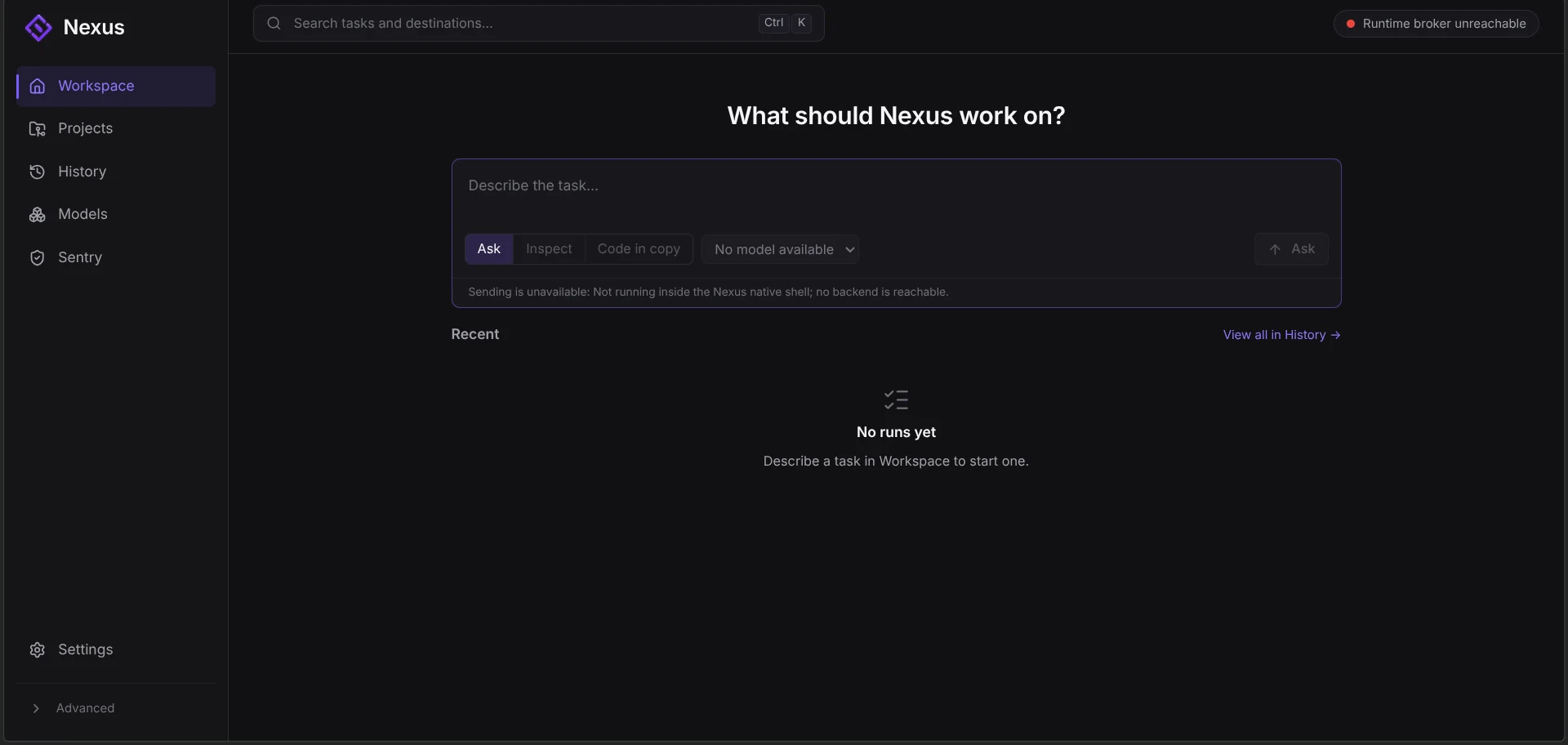
Built natively. Engineered for control.
The Native Core is the execution infrastructure beneath the interface: Rust components, explicit process boundaries and recorded task state.
A chat window can display a convincing answer without proving what happened. Nexus separates the interface from the machinery responsible for supported execution and its records.
Existing source components · enabled behavior is scope-dependentWhat actually happens when you submit a task to Nexus?
Choose a component. Follow the highlighted relationships and inspect the example request at that boundary.
A source-grounded, simplified inspect example. It does not prescribe one runtime path for every task or run a real inspection.
Describe the inspection
The desktop captures “Inspect this project and identify potential issues.” A selected registered workspace is required; text alone grants no access.
Input: inspect objective + registered workspace identity.Go deeper: how it works and what is implemented
Interface versus infrastructure. The desktop renderer collects input and displays responses. Typed native clients, broker/daemon paths, authorization boundaries and stores carry supported execution responsibilities. Selecting a diagram component does not submit a task.
The map simplifies relationships; it is not a live request trace. Rust modules for acceptance, approvals, readiness, integrity, tools and transactional state exist. Individual execution scopes can still be unavailable or refused.
Connections to the other features. Registry supplies resolved configuration. Planned Nova would coordinate work through supported runtime boundaries. Context continuity needs its own grounded records and validation; it is not owned by the window.
Complex work. Coordinated intelligence.
Nova is the planned coordinator for complex engineering work. It is intended to connect an objective, work units, model assignments, tools and feedback.
A difficult task rarely fits into one unexamined instruction. The coordination problem is deciding what needs to happen, what depends on it, and what evidence the next decision needs.
Planned / non-runnable in inspected source · all steps below are illustrative- 01 / Work units
Storage behavior → task interactions. The second unit depends on the first.
- 02 / Worker roles
Storage worker and interaction worker are conceptual coding responsibilities, subject to Registry eligibility.
- 03 / Returning evidence
Observations collect into a result package. Independent findings return to the relevant work; gaps remain open.
“Build an offline-first task manager.”
A worker means an assigned role in the example. A dependency means one piece of work needs information or an outcome from another.
Receive the objective
- What enters
- Build an offline-first task manager.
- Decision illustrated
- Keep the user’s objective as the starting point, without pretending it is already a complete specification.
- Who is responsible
- Planned Nova coordinator
- What leaves
- An objective linked to the illustrative task.
Why this step mattersWork stays tied to what the user asked for.
Go deeper: how it works and what is implemented
The inspected Nova manifest declares planned Planner, Engineer, Reviewer, Verifier and optional Specialist slots. It is explicitly non-selectable and non-runnable. Declaring slots is not proof that the proposed orchestration is implemented.
Registry validation supplies compatible configuration; it does not create the plan. Supported Native Core paths enforce execution boundaries. Context records must preserve grounded decisions and open work. Sentry is a separate application at the illustrated review boundary, with feedback returning through Nexus.
No model is called, tool is run, code is generated or verification result is invented by this simulator. “Result package” and “finding” refer to the authored example only.
Keep what matters. Continue with confidence.
A model can only work with a finite amount of context at once. Long sessions accumulate requests, decisions, observations and attempts until that working history becomes difficult to carry forward.
Compaction is about preparing useful, grounded continuation context. A short summary alone cannot establish which state is authoritative, which evidence can be recovered, or what work is still open.
Existing primitives and planning · durable CCv2 mutation disabled in inspected policy- Kept directly · C01 / C02 / C09
- Offline-first objective, local task requirements, title validation and storage-failure questions.
- Reorganized · C03 / C06 / C08
- Local-data decision, checkpoint and current execution state become structured context.
- Referenced · C04 / C07
- Storage observation and design note require validated, durable references.
Reduced history keeps its original identity in the inspector. Unfinished work never becomes a completion claim.
A working history, with a clearer way forward.
Explore an authored example session. Before shows its working history; After shows how each item could be represented. Every entry—including reduced history—remains inspectable here.
Working history
A long working session contains intent, decisions, observations and unfinished work. Every card represents an authored example record.
Select any moving record to pause and inspect its original and resulting treatment below.Don’t cut through unfinished work.
A tool request without its result is an open interaction. A checkpoint boundary needs a coherent state, not half of an operation.
This example has no open tool pair. Freshness, coverage and other required checks would still be needed.
Illustrative rule only. No checkpoint is created; durable CCv2 writing remains disabled.Go deeper: how it works and what is implemented
SafePointDetector checks whether an operational boundary is coherent, including open tool calls, streams and transitions. It does not itself trigger compaction or create a checkpoint.
Grounded checkpoints represent the objective, decisions, execution state and outstanding work with identity and validation. Freshness checks ask whether the inspected state has changed; coverage checks ask whether required continuation state is represented.
Trust and seal mechanisms distinguish where values came from. Tool or repository text does not become authoritative just because it is stored in a checkpoint. The content seal binds integrity; it is unkeyed and is not issuer authentication or a guarantee of safety.
Retention planning is not arbitrary card deletion. The inspected planner considers an eligible old stretch of history and keeps the newer tail intact. Age alone is not eligibility. Coverage and valid durable references matter; planning itself does not delete or apply context.
Connection to the wider system. Context mechanisms support permitted execution paths, and actual model context constraints matter to budgeting. This authored ledger is not a real retention plan, compression benchmark or production recovery demonstration. Durable mutation is disabled in the inspected source.
Your models. Your rules.
The Model Registry manages definitions and configuration: which model, which provider route, what capabilities are declared, and what constraints a role assignment must satisfy.
Different models have different capabilities and requirements. A name in a list does not tell an orchestrator whether that model is compatible, configured or available for the intended role.
Existing validation/resolver source · all records and statuses below are fictionalRead each candidate’s reason below; play the evaluation or inspect its final state.
- Sample ARejected · role does not match
- Sample BAccepted · role + configured route
- Sample CRejected · role does not match
A model is more than a name.
Select an entry to read its fields. Provider One and Provider Two are fictional; no live account, real model limit, pricing or benchmark is shown.
Fictional entries are checked against the requested role/capability and configured connection. The animation exposes exclusions; Registry does not choose the task plan.
Sample B
A fictional coding entry. “Tool use” is an illustrative capability tag, not permission to run arbitrary tools.
- Model definition
- Sample BThe logical model identity, kept separate from where it is accessed.
- Provider
- Provider OneThe fictional service relationship for this sample entry.
- Capabilities
- coding · tool useDeclared sample metadata; not measured performance or permission to execute tools.
- Worker role
- coderThe sample responsibility this configuration is intended to support.
- Context constraint
- Requirements + working tailAn illustrative context policy. No real token limit or provider capacity is supplied.
- Route identity
- sample-b / provider-oneThe model/provider relationship to validate for this example.
- Configuration status
- Configured in sampleAvailability and a configured connection are different from having a model listed.
Configuration informs coordination.
Nova would ask for a compatible role configuration. Registry validation supplies a result or a refusal; it does not decide the task plan or run the worker.
The sample request supplies a role requirement. It is independent from the model entry you are browsing above.
Go deeper: how it works and what is implemented
The inspected Registry resolver validates mode/slot references, model/provider/route identity, role capabilities, reasoning support, runtime compatibility and connection eligibility before compiling an immutable snapshot. It fails closed instead of silently substituting a model or reducing the requested configuration.
Registry is configuration and validation authority, not a task orchestrator. The inspected Nova manifest remains planned and non-runnable. Native execution has its own authorization boundaries; context engineering has its own grounded state and validation responsibilities.
These sample fields explain the concepts, not an actual Registry schema editor. No setting, credential, provider connection or application file is changed by this explorer.
Progress needs evidence.
The model performs engineering work. The controller owns attempts, verification and completion.
Implemented controller mechanisms · native execution remains path-specific and restricted. Nova multi-worker orchestration is planned.
- 01
Ground the task
Compile requirements and collect task-local evidence before planning.
- 02
Control execution
Bound attempts and tools. Deeper reasoning requires an evidence-backed escalation, then explicit de-escalation.
- 03
Verify the work
Record scoped checks and link results to requirements. Implemented does not mean verified.
- 04
Review the boundary
Keep independent review separate. Operator-gated actions require explicit authorization.
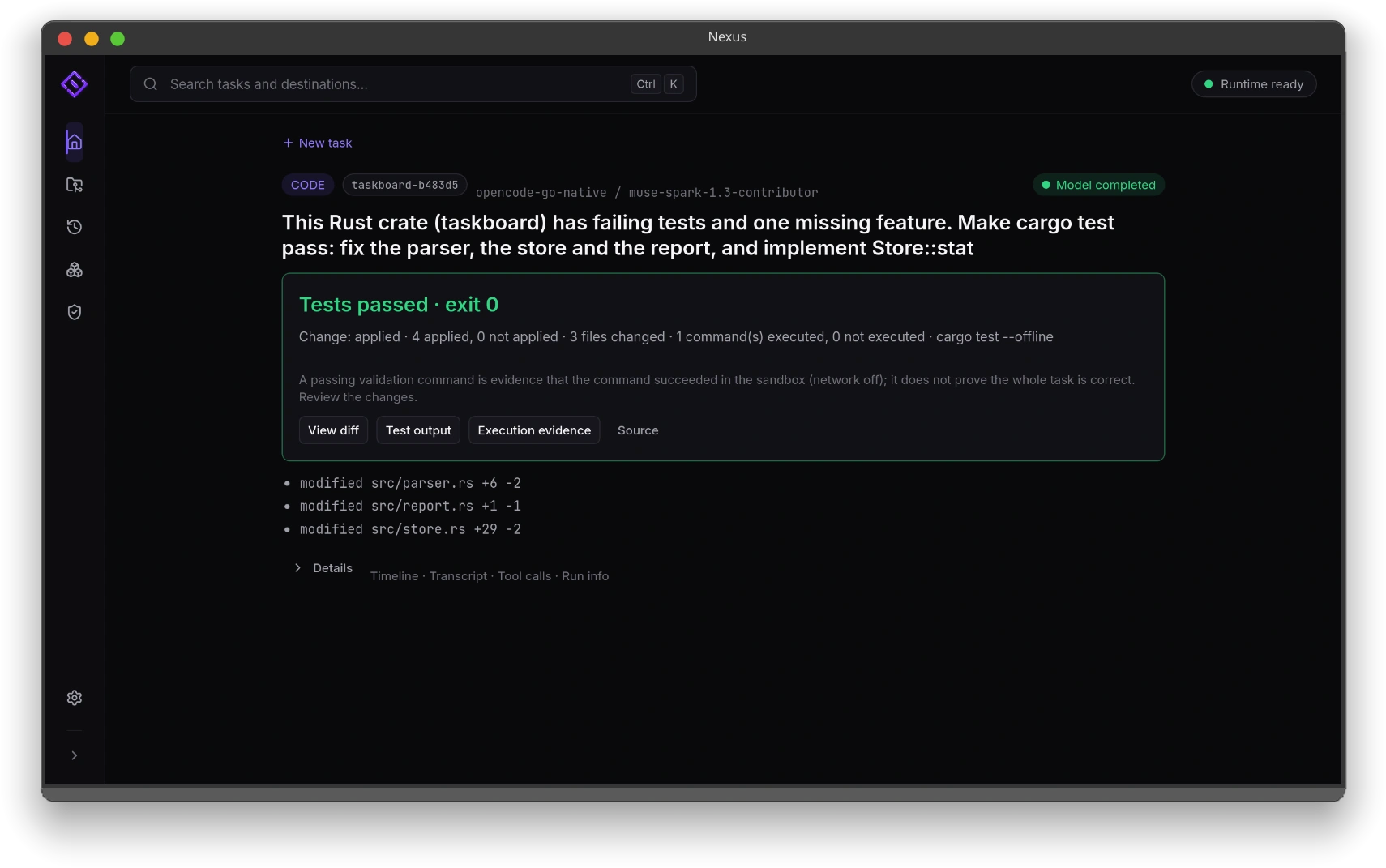
Engineering Mode: what exists, what is restricted, what is planned
Implemented controller mechanisms. Requirement traceability, a task-local Working Set, recorded decisions, scoped verification, retry discipline and independent read-only review are documented in the existing controller. A completion gate can require verified requirements. These mechanisms are not persistent cognitive memory.
Restricted native execution. Native acceptance, task bindings, tool authorization and supported coding paths enforce their own boundaries. Checkpoints and safe-point primitives do not establish general durable CCv2 mutation; that policy remains disabled. The controller documentation does not imply every mechanism is exposed in each native path.
Mode boundaries. The inspected Registry marks v1 deprecated, v2 active-legacy with a single-agent contract, and v3 / Nova planned and non-runnable. Do not read the Nova demonstration as currently executable parallel engineering.
Your workspace. Your way in.
A visual workspace for the task. A command line for direct inspection. Both use explicit native client boundaries.
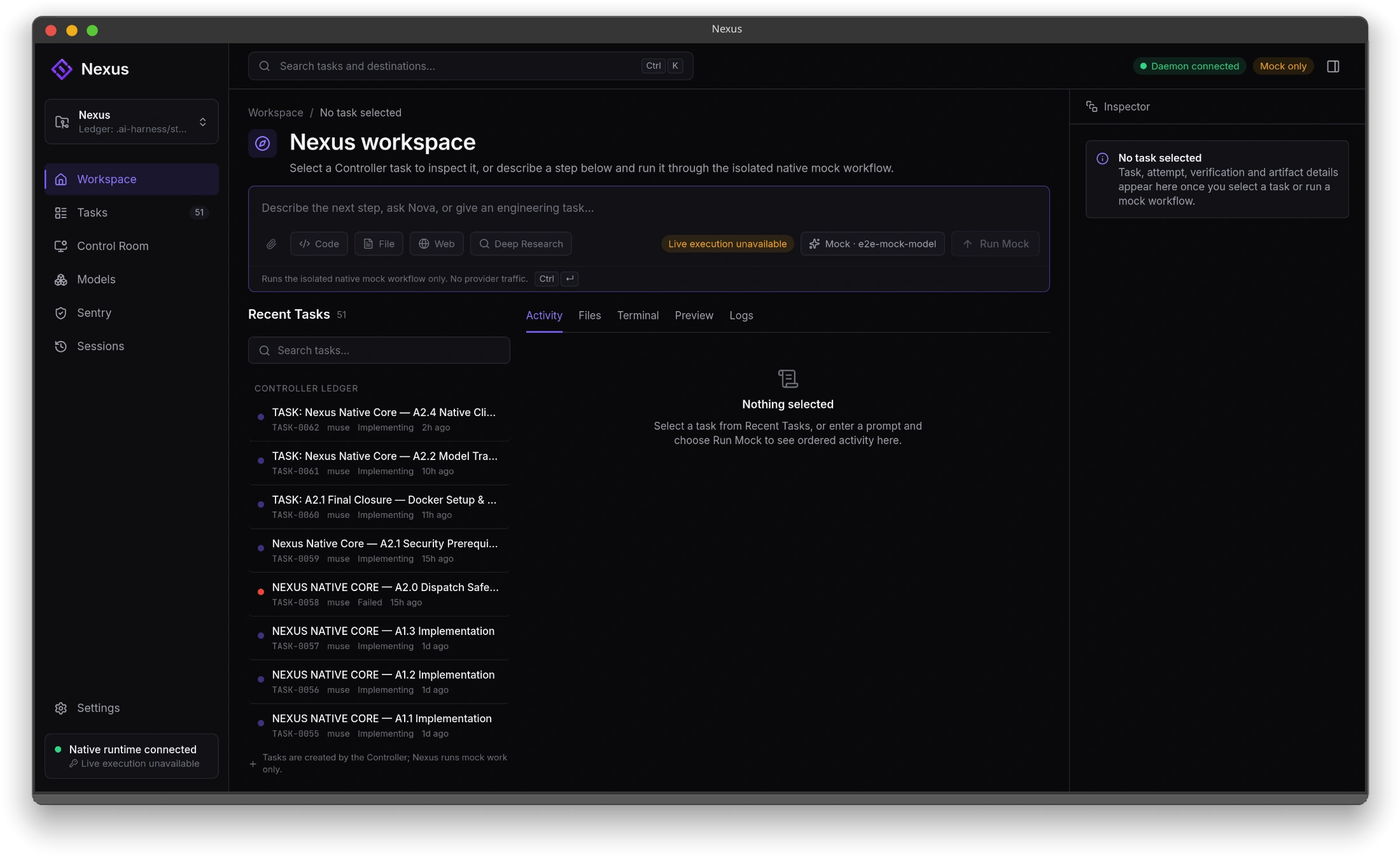
The renderer talks through typed Tauri commands to the native client and daemon. It does not own model routing, credentials or the task database.
Inspect before you act.
nexus status- Inspect daemon and readiness status.
nexus doctor- Check the local daemon, socket and toolchain.
nexus tasks --json- Read tasks through the native client boundary.
Command reference from inspected native CLI source. No command is executed here; no terminal result is simulated. Native runtime and provider setup are separate from installing an artifact.
Read the source and documentation ↗A second perspective. An independent boundary.
Sentry is a separate ArthurLabs application. The intended handoff carries scope and evidence outward, then brings findings back through Nexus.
Integration unavailable in the inspected native desktop · no Sentry API or findings are exposed there yet.
- NEXUS → SENTRY
Scope + evidence
An intended review package preserves requirements, observations and explicit gaps.
- SENTRY / SEPARATE APPLICATION
Independent verification
Review takes place outside the Native Core. A finding does not grant execution or completion authority.
- SENTRY → NEXUS
Findings + next steps
The intended return path associates findings with the work and leaves unresolved questions visible.
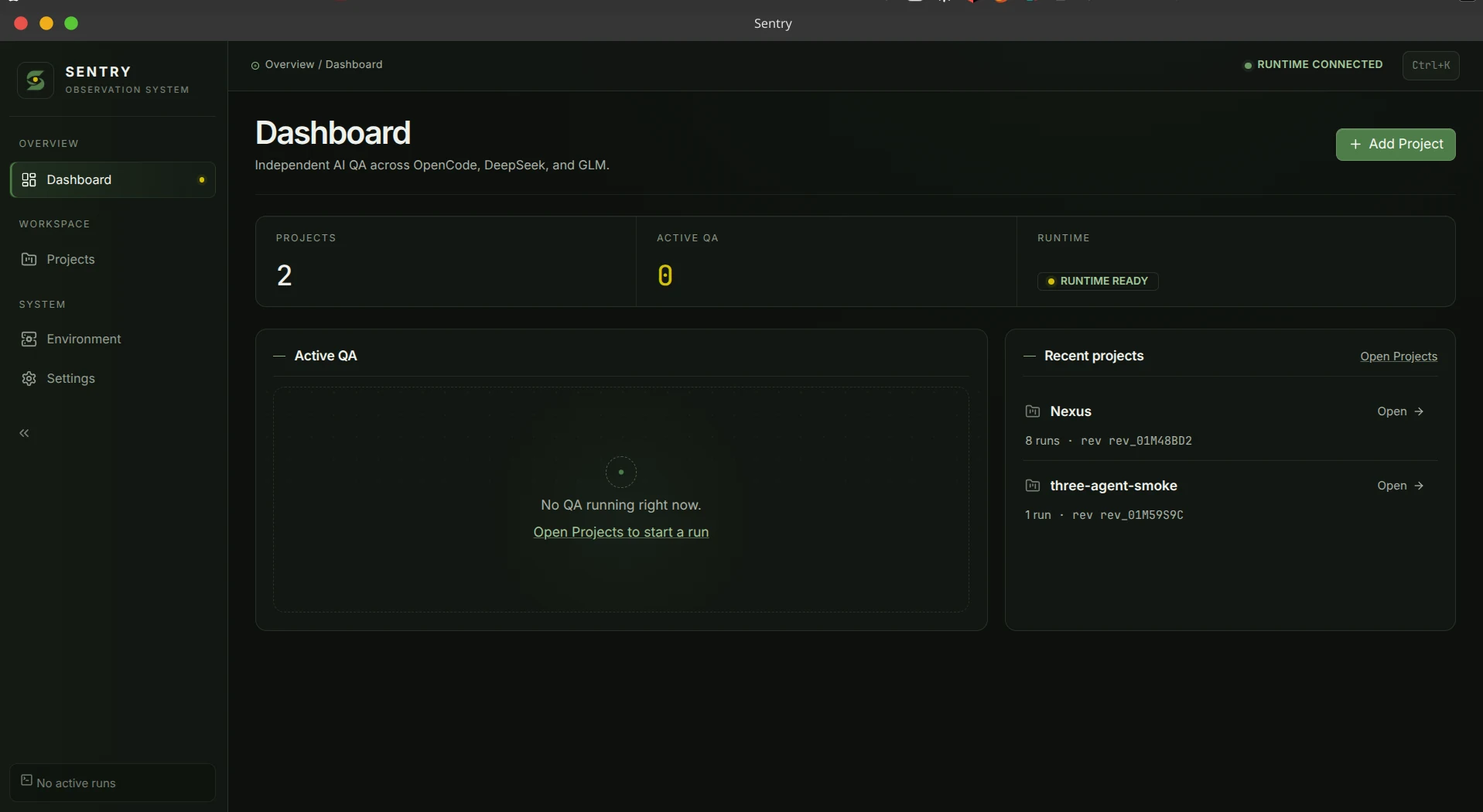
The engine.
On your terms.
Nexus is an independent desktop and command-line application. Explore it on its own, or alongside Arthur Studio and Sentry.
No verified downloadable Nexus artifact is listed. Platform compatibility, architectures and installation requirements will be published with verified releases.
Windows release information is pending.
No verified Windows installer or architecture is published in this catalog. Installation guidance and release notes will accompany a verified artifact.
DESKTOP / CLI DISTRIBUTION DETAILS NOT YET VERIFIEDBefore you install.
When a release is verified, check its operating system, architecture and requirements, then follow the instructions attached to that artifact. No installation command is supplied before those details are confirmed.
Independent. Connected.
The suite contains independent applications. Nexus remains its own desktop/CLI product; no suite launcher or unified installer is implied.
Explore Nexus as part of the ArthurLabs Suite. ↗Understand the system. Build with clarity.
Start with the documented controller baseline, inspect the source, or explore Nexus alongside Arthur Studio and Sentry.
Read the engineering baseline.
Controller authority, lifecycle, setup and operations. Native development features may be ahead of this public baseline.
SOURCE ↗Inspect the implementation.
The verified public Nexus repository. Source availability does not establish packaged release availability.
ARTHURLABS SUITE ↗One connected ecosystem.
Explore Nexus as part of the ArthurLabs Suite. Three independent applications; no suite launcher or implied unified installer.